Have you ever wondered how to incorporate figures and tables in your APA documents? Maybe you aren’t sure why you would. Have you ever wondered when or how to use figures and tables in APA style? Figures and tables can help organize information, highlight key data, and make complex ideas easier to understand for your reader. This resource explains why figures and tables can be effective and shows you how to include them correctly in your APA papers. You will also find a visual, step‑by‑step guide for formatting figures and tables in Microsoft Word.
When writing an APA-style paper, you may have data or statistical information that is best presented in table format because tables are well-organized and easy to read. In APA, tables have five basic components: a table number, a title, column headings, the table body (headings, rows, and columns), and an optional table note. For basic table setup, follow these steps:
1. Include a table number left-aligned and bold in the body of your paper above where you will insert the table. Number your tables in order as they appear in your paper.
2. Include a title for your table that briefly describes its contents. Place the title in the body of your text below the table number (see Step 1). The title should be left-aligned and in italics. NOTE: The table number and title are double-spaced like the rest of your paper.
3. Below the table’s title, use Microsoft Word’s table feature to insert your table and begin setting up columns and headings. It can be helpful to turn on the View Gridlines option in the Table Layout tab as you build your table.
4. Once you have designed the table, include your note (optional) below the table in the body of the paper. Begin with the word “Note” left-aligned and in italics, followed by a period. The note can include a description of the table or an explanation about terms and abbreviations.
- The table body can be double-spaced or single-spaced
- Left-align headings in the left column and center remaining headings
- Center contents in all other cells
- Do not use vertical borders and limit horizontal borders
- Always mention the table in the body of your paper. This should appear before you insert the table.
The four steps and general tips will help you set up a basic table. For more information on each component, see Figure 1 (below), a screenshot of the diagram from the APA website that describes table components in detail.

From American Psychological Association (APA), by APA, 2021 (https://apastyle.apa.org/images/table-setup-image_tcm11-262906_w1024_n.jpg) Copyright 2021 by APA
Use this link to view Sample Tables from the APA Style website. To see a demonstration of formatting tables in APA, watch the following video:
Now that we’ve reviewed tables in APA Style, the good news is that figures have the same basic setup as tables, and any “visual displays other than tables are considered figures in APA Style” (American Psychological Association, 2021a, para. 1). In other words, if it’s an image that’s not a table, you will use the following guidelines to set it up in your APA Style paper. Figures include charts, graphs, infographics, pictures, illustrations, and more.
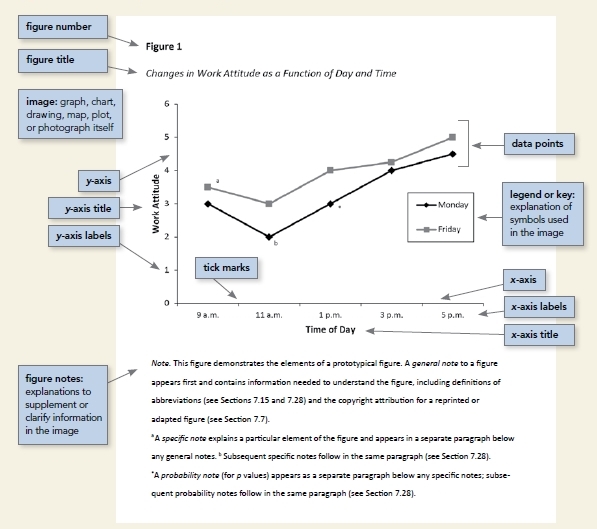
In APA, figures also have five basic components: a figure number, a figure title, the image itself, an optional legend, and an optional note. For basic figure setup, follow these steps:
1. Include a figure number left-aligned and bold in the body of your paper above where you will insert the figure. Number your figures in order as they appear in your paper.
2. Include a title for your figure that briefly describes its contents. Place the title in the body of your text below the figure number (see Step 1). The figure should be left-aligned and in italics. NOTE: The figure number and title are double-spaced like the rest of your paper.
3. Below the figure’s title, insert the figure. If you are creating the figure yourself, please use Microsoft Word, Excel, or other graphics software to create clear figures.
4. Once you have inserted the figure, include a note (optional) below the table in the body of the paper. Begin with the word “Note” left-aligned and in italics, followed by a period. The note can include a description of the figure or an explanation about terms and abbreviations.
- Ensure the image is clear and not blurry with crisp lines and legible font
- When creating images, include units of measurement and label axes and figure elements
- Always mention the figure in the body of your paper. This should appear before you insert the figure.
The four steps and general tips will help you set up a basic figure. For more information on each component, see Figure 2 below, a screenshot of the diagram from the APA website that describes figure components in detail.

From American Psychological Association (APA), by APA, 2021 (https://apastyle.apa.org/images/figure-setup-image_tcm11-262908_w1024_n.jpg) Copyright 2021 by APA
Use this link to view Sample Figures from the APA Style website. To see a demonstration of formatting figures in APA, watch the following video:
American Psychological Association. (2021a). Figure setup. APA Style. https://apastyle.apa.org/style-grammar-guidelines/tables-figures/figures
American Psychological Association. (2021b). Table setup. APA Style. https://apastyle.apa.org/style-grammar-guidelines/tables-figures/tables
Need Additional Assistance?
Want additional support? Sign up for our group sessions. Take a look at the full workshop schedule. For help signing up and accessing the Academic Support Center, see the How to Book ASC Sessions Page.